
Kafka on Kubernetes
When Network Policy Stops Being Theoretical
Working as a solutions architect while going deep on Kubernetes security — prevention-first thinking, open source tooling, and a daily rabbit hole of hands-on learning. I make the mistakes, then figure out how to fix them (eventually).
Kafka is often treated as background infrastructure. It quietly moves events between services like payments, analytics, notifications, etc. So it easy to view it as internal plumbing.
But Kafka is not just another service on the network.
If a workload can reach a Kafka broker, it may be able to read historical messages across entire topics. Those topics often contain operational data, user identifiers, or financial events that were never meant to be broadly accessible. The tricky part is that nothing breaks when this happens. Confidentiality failures in Kafka are usually silent. The system keeps running normally while data quietly flows somewhere it should not.
In Kubernetes environments this often starts with networking. By default, pods can communicate freely across namespaces, which means a compromised or misconfigured service may be able to connect to Kafka and consume data it was never meant to see.
In this post we will deploy a simple Kafka cluster with Strimzi, show how an unintended workload can read sensitive events, and then use networkPolicyPeers and Cilium network policy to enforce the architecture the platform actually intended. The goal is simple. Turn this:
Any pod that can reach Kafka can read Kafka
into this:
Only the workloads that should talk to Kafka can reach Kafka
If you are not familiar with Kafka, it helps to think of it as a distributed event log that services use to publish and consume messages. Producers write events to topics, and consumers read those events to process work or trigger downstream actions. If that model is new to you, it is worth taking a few minutes to read a quick Kafka introduction before continuing. Or what this cool video from Confluent.
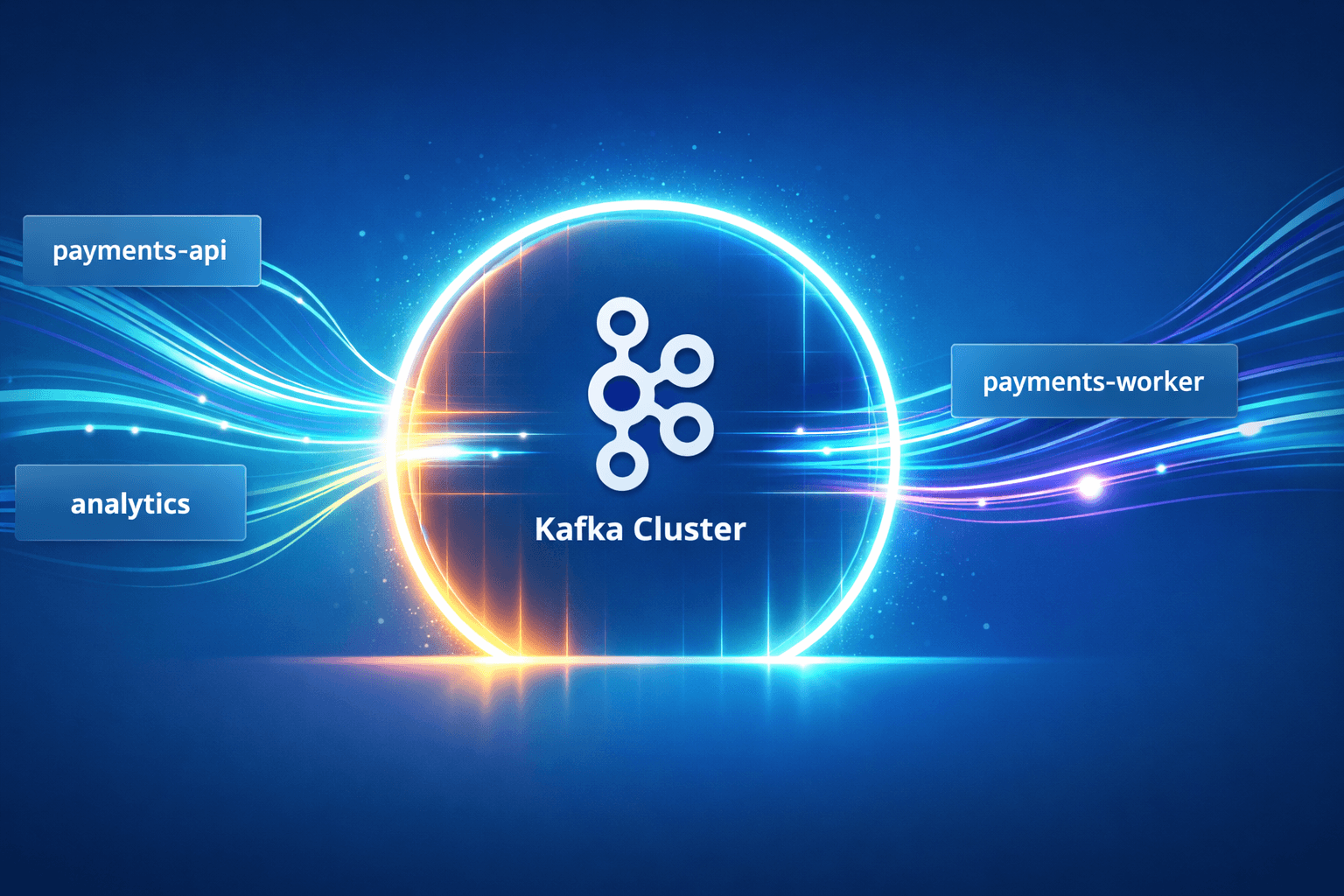
Orientation Diagram
Keep this diagram in mind.

The architecture is straightforward. payments-api submits payment commands, payments-worker processes them, and Kafka moves the events between services. Workloads outside that flow should not be interacting with Kafka at all.
In theory that separation seems obvious, but Kubernetes does not enforce it by default. If a pod can reach Kafka, it can usually talk to it. The rest of this post walks through that behavior and then shows how NetworkPolicy can enforce the boundaries the platform actually intended.
The Architecture We Think We Built
For this example we will model a simple event-driven payments system. Kafka runs in a dedicated namespace called platform-data. Application workloads live in their own namespaces and communicate with Kafka to produce or consume events.
Two services exist in the payments namespace:
payments-api Internet-facing service that receives payment requests. Its only responsibility is to produce messages to the
payments.commandstopic.payments-worker Internal service that processes those commands and produces results to
payments.events.
The system also contains an unrelated namespace:
- analytics Batch jobs and internal tooling that should not interact with the payments pipeline at all.
The Kafka topics look like this:
payments.commands
payments.events
The intended architecture is straightforward.
payments-api      → produce → payments.commands
payments-worker   → consume → payments.commands
payments-worker   → produce → payments.events
analytics         → no Kafka access
In other words, the API tier can submit payment requests, the worker tier processes them, and the resulting events are published for downstream consumers. Under this model, the payments.events topic may contain sensitive operational data such as payment identifiers, customer references, or transaction outcomes. Only trusted internal services should be able to read from it.
The assumption many teams make is that Kubernetes namespaces and service boundaries already enforce this separation.
Baseline Deployment
To understand the problem, we will first deploy the architecture from the previous diagram. This section sets up a Kafka cluster, creates the payment topics, and deploys the example workloads. No network policy is applied yet.
The goal is simply to establish a working environment before we test how workloads interact with Kafka.
Create Namespaces
kubectl create ns platform-data
kubectl create ns payments
kubectl create ns analytics
platform-data will host Kafka, while application workloads live in their own namespaces.
Install the Strimzi Operator
matt@ciliumcontrolplane:~/kafka$ kubectl apply -f 'https://strimzi.io/install/latest?namespace=platform-data' -n platform-data
clusterrole.rbac.authorization.k8s.io/strimzi-cluster-operator-leader-election created
deployment.apps/strimzi-cluster-operator created
customresourcedefinition.apiextensions.k8s.io/kafkanodepools.kafka.strimzi.io unchanged
clusterrole.rbac.authorization.k8s.io/strimzi-cluster-operator-global created
...
Strimzi manages the lifecycle of the Kafka cluster inside Kubernetes.
Deploy Kafka
Save the following as kafka.yaml.
apiVersion: kafka.strimzi.io/v1
kind: KafkaNodePool
metadata:
  name: demo-pool
  namespace: platform-data
  labels:
    strimzi.io/cluster: demo
spec:
  replicas: 3
  roles:
    - controller
    - broker
  storage:
    type: ephemeral
---
apiVersion: kafka.strimzi.io/v1
kind: Kafka
metadata:
  name: demo
  namespace: platform-data
spec:
  kafka:
    version: 4.1.1
    listeners:
      - name: plain
        port: 9092
        type: internal
        tls: false
    config:
      default.replication.factor: 3
      min.insync.replicas: 2
      offsets.topic.replication.factor: 3
      transaction.state.log.replication.factor: 3
      transaction.state.log.min.isr: 2
      inter.broker.protocol.version: "4.1"
This manifest deploys a small Kafka cluster using Strimzi. The KafkaNodePool defines three nodes that act as both controllers and brokers, which is enough to run a functional cluster for testing. Storage is configured as ephemeral since the goal of this environment is just demonstration.
The Kafka resource configures the broker itself. It exposes an internal listener on port 9092, disables TLS for simplicity, and sets the replication settings so topics can be replicated across the three brokers.
In short, this creates a minimal but fully functional Kafka cluster that other workloads in the cluster can connect to through the demo-kafka-bootstrap service.
matt@ciliumcontrolplane:~/kafka$ kubectl apply -f kafka.yaml
kafkanodepool.kafka.strimzi.io/demo-pool created
kafka.kafka.strimzi.io/demo created
Verify the Kafka services:
kubectl get svc -n platform-data | grep demo-kafka
Create Kafka Topics
Launch a temporary Kafka CLI pod:
kubectl -n payments run kafka-toolbox --image=quay.io/strimzi/kafka:0.40.0-kafka-3.7.0 --restart=Never -- sleep 1d
This creates a temporary pod containing the Kafka CLI tools. The pod runs sleep 1d so it stays alive long enough for us to execute commands inside it with kubectl exec. We will use it to create topics and interact with the Kafka cluster from inside Kubernetes.
Create the topics used by the payments system. Kafka prints a warning about topic names containing . or _. This does not affect the topic itself. The topic is created successfully and can be used normally.
kubectl -n payments exec -it kafka-toolbox -- /opt/kafka/bin/kafka-topics.sh --bootstrap-server demo-kafka-bootstrap.platform-data.svc:9092 --create --topic payments.commands --partitions 3 --replication-factor 3
kubectl -n payments exec -it kafka-toolbox -- /opt/kafka/bin/kafka-topics.sh --bootstrap-server demo-kafka-bootstrap.platform-data.svc:9092 --create --topic payments.events --partitions 3 --replication-factor 3
These commands create the two topics used by the payment system. payments.commands will carry incoming payment requests, while payments.events will contain the resulting payment outcomes. Each topic is created with three partitions and a replication factor of three so the data is distributed across the Kafka brokers.
Deploy the Example Workloads
Create two simple pods representing the application services.
payments-api
kubectl -n payments run payments-api --labels app=payments-api --image=quay.io/strimzi/kafka:0.40.0-kafka-3.7.0 --restart=Never -- sleep 1d
payments-worker
kubectl -n payments run payments-worker --labels app=payments-worker --image=quay.io/strimzi/kafka:0.40.0-kafka-3.7.0 --restart=Never -- sleep 1d
These pods simply provide access to the Kafka CLI tools so we can simulate application behavior.
Testing Kafka Access
Now that the environment is deployed, we can test how workloads interact with Kafka.
Generate Payment Events
From the worker pod:
kubectl -n payments exec -it payments-worker -- bash -lc 'for i in {1..5}; do echo "{\"payment_id\":\"p-\(i\",\"status\":\"APPROVED\",\"customer\":\"cust-\)i\",\"amount\":$((i*10))}" done | /opt/kafka/bin/kafka-console-producer.sh --bootstrap-server demo-kafka-bootstrap.platform-data.svc:9092 --topic payments.events'
This command generates a few sample payment events and sends them to the payments.events topic using the Kafka console producer.
Intended Read
The worker should be able to read the events it produces.
matt@ciliumcontrolplane:~/kafka$ kubectl -n payments exec -it payments-worker -- /opt/kafka/bin/kafka-console-consumer.sh --bootstrap-server demo-kafka-bootstrap.platform-data.svc:9092 --topic payments.events --from-beginning --timeout-ms 8000
{"payment_id":"p-1","status":"APPROVED","customer":"cust-1","amount":10}
{"payment_id":"p-2","status":"APPROVED","customer":"cust-2","amount":20}
{"payment_id":"p-3","status":"APPROVED","customer":"cust-3","amount":30}
{"payment_id":"p-4","status":"APPROVED","customer":"cust-4","amount":40}
{"payment_id":"p-5","status":"APPROVED","customer":"cust-5","amount":50}
Processed a total of 5 messages
This succeeds as expected.
Unintended Read
Now run the same command from payments-api.
matt@ciliumcontrolplane:~/kafka$ kubectl -n payments exec -it payments-api -- /opt/kafka/bin/kafka-console-consumer.sh --bootstrap-server demo-kafka-bootstrap.platform-data.svc:9092 --topic payments.events --from-beginning --timeout-ms 8000
{"payment_id":"p-1","status":"APPROVED","customer":"cust-1","amount":10}
{"payment_id":"p-2","status":"APPROVED","customer":"cust-2","amount":20}
{"payment_id":"p-3","status":"APPROVED","customer":"cust-3","amount":30}
{"payment_id":"p-4","status":"APPROVED","customer":"cust-4","amount":40}
{"payment_id":"p-5","status":"APPROVED","customer":"cust-5","amount":50}
Processed a total of 5 messages
This works because nothing in the cluster currently limits which pods can reach Kafka. The payments-api pod can connect to the same broker service as payments-worker, and Kafka does not distinguish between them in this demo. As long as a pod can reach the broker, it can consume the topic.
Cross Namespace Access
Even unrelated workloads can reach Kafka.
kubectl -n analytics run analytics-random --image=quay.io/strimzi/kafka:0.40.0-kafka-3.7.0 --restart=Never -- sleep 1d
Then consume events:
matt@ciliumcontrolplane:~/kafka$ kubectl -n analytics exec -it analytics-random -- /opt/kafka/bin/kafka-console-consumer.sh --bootstrap-server demo-kafka-bootstrap.platform-data.svc:9092 --topic payments.events --from-beginning --timeout-ms 8000
{"payment_id":"p-1","status":"APPROVED","customer":"cust-1","amount":10}
{"payment_id":"p-2","status":"APPROVED","customer":"cust-2","amount":20}
{"payment_id":"p-3","status":"APPROVED","customer":"cust-3","amount":30}
{"payment_id":"p-4","status":"APPROVED","customer":"cust-4","amount":40}
{"payment_id":"p-5","status":"APPROVED","customer":"cust-5","amount":50}
Processed a total of 5 messages
Restricting Kafka Access with Strimzi Network Peers
So how can we make this a bit safer? The first improvement is to restrict which workloads can reach the Kafka listener at all.
Strimzi can generate a Kubernetes NetworkPolicy for Kafka listeners directly from the Kafka resource definition. Taking a look we can see what it created.
matt@ciliumcontrolplane:~/kafka$ kubectl get netpol -A
NAMESPACE       NAME                        POD-SELECTOR                                                               AGE
platform-data   demo-network-policy-kafka   strimzi.io/cluster=demo,strimzi.io/kind=Kafka,strimzi.io/name=demo-kafka   115m
Oddly enough we never did anything to create this. So what if we want to change this? You can do that through the networkPolicyPeers field on the listener configuration. Instead of leaving the listener open to the entire cluster, we can limit which namespaces or pods are allowed to connect to the broker port.
Below is a simplified example restricting access to the payments namespace.
listeners:
  - name: plain
    port: 9092
    type: internal
    tls: false
    networkPolicyPeers:
      - namespaceSelector:
          matchLabels:
            kubernetes.io/metadata.name: payments
When this configuration is applied, Strimzi generates a Kubernetes NetworkPolicy that allows connections to the Kafka listener only from workloads in the payments namespace.
So once we've applied let's try one inside the namespace and one outside as before.
Works:
matt@ciliumcontrolplane:~/kafka$ kubectl -n payments exec -it payments-worker -- /opt/kafka/bin/kafka-console-consumer.sh --bootstrap-server demo-kafka-bootstrap.platform-data.svc:9092 --topic payments.events --from-beginning --timeout-ms 8000
{"payment_id":"p-1","status":"APPROVED","customer":"cust-1","amount":10}
{"payment_id":"p-2","status":"APPROVED","customer":"cust-2","amount":20}
{"payment_id":"p-3","status":"APPROVED","customer":"cust-3","amount":30}
{"payment_id":"p-4","status":"APPROVED","customer":"cust-4","amount":40}
{"payment_id":"p-5","status":"APPROVED","customer":"cust-5","amount":50}
Processed a total of 5 messages
Doesn't Work:
matt@ciliumcontrolplane:~/kafka$ kubectl -n analytics exec -it analytics-random -- /opt/kafka/bin/kafka-console-consumer.sh --bootstrap-server demo-kafka-bootstrap.platform-data.svc:9092 --topic payments.events --from-beginning --timeout-ms 8000
Processed a total of 0 messages
That is great, but it would probably be easier to manage it outside using your ordinary NetworkPolicy or CiliumNetworkPolicy. But how can we do that if we really have no choice in either a default NetworkPolicy or a custom NetworkPolicy being created.
Bring Your Own NetworkPolicy
Restricting the Kafka listener with Strimzi networkPolicyPeers works, but it also introduces another layer of policy management that may not always be desirable.
Instead, we can allow Strimzi to generate its listener policy while making it effectively match no real workloads. This keeps the listener closed by default and lets us explicitly manage access using our own network policies.
One simple way to do this is to configure the listener peers so they match a namespace that does not exist.
listeners:
  - name: plain
    port: 9092
    type: internal
    tls: false
    networkPolicyPeers:
      - namespaceSelector:
          matchLabels:
            kubernetes.io/metadata.name: neverusedns
With this configuration, the Strimzi-generated NetworkPolicy no longer matches real client pods. The Kafka listener is effectively closed to normal workloads.
From there, we can explicitly allow the intended clients using a Cilium network policy.
apiVersion: cilium.io/v2
kind: CiliumNetworkPolicy
metadata:
  name: kafka-worker-only
  namespace: platform-data
spec:
  endpointSelector:
    matchLabels:
      k8s:app.kubernetes.io/instance: demo
      k8s:io.kubernetes.pod.namespace: platform-data
  ingress:
    - fromEndpoints:
        - matchLabels:
            k8s:app: payments-worker
            k8s:io.kubernetes.pod.namespace: payments
      toPorts:
        - ports:
            - port: "9092"
              protocol: TCP
This policy selects the Kafka broker pods in the platform-data namespace and allows inbound traffic to port 9092 only from pods labeled app=payments-worker in the payments namespace.
Wrap Up
This exercise originally started while experimenting with a Kafka-aware Cilium feature that is now being deprecated. While that path turned out to be a dead end, it ended up being a useful way to explore how network policy actually behaves in a real Kubernetes use case.
What the experiment ultimately showed is that network policy is very good at shrinking the trust boundary, but it cannot eliminate trust entirely.
In our case we moved through three stages:
Default Kubernetes networking where any pod could reach Kafka
Restricting listener access with Strimzi
networkPolicyPeersExplicitly allowing only the required workload using a Cilium policy for ease of management
Each step reduced the blast radius. Instead of trusting the entire cluster, we narrowed the boundary to a specific application, and finally to a specific workload.
But some trust still remains. If both a producer and consumer legitimately need to reach Kafka, the network layer alone cannot perfectly distinguish their roles. At some point the system must trust that the service behaves the way the architecture intends.
Security controls rarely eliminate trust boundaries, but they do make them smaller and more explicit.
In this example, the goal was not to achieve perfect isolation. It was to turn a flat cluster network where any pod could read Kafka into a system where only the workloads that should talk to Kafka can reach it at all.