
From Capabilities to AppArmor: Layering Linux Runtime Security
Capabilities, seccomp, and AppArmor working together to shut down the bad stuff
Working as a solutions architect while going deep on Kubernetes security — prevention-first thinking, open source tooling, and a daily rabbit hole of hands-on learning. I make the mistakes, then figure out how to fix them (eventually).
Over the past year I have written ad nauseum about Linux security primitives. And of course quite a bit of time has been dedicated to how these connect into Kubernetes. Some of the cooler aspects include how we can enforce this through securityContext and then layer in tools like Kyverno and KubeArmor to actually make it usable in a real environment.
That part is fairly well understood. What is murkier is the actual usefulness of these controls and how they fit together, especially when you start using more than one at the same time.
So instead of breaking them down individually again, it makes more sense to step back and look at how they behave against a real workload.
There are three specific security controls in Linux, and subsequently Kubernetes, that are worth focusing on:
These are usually explained in isolation. Sometimes they are implemented that way too. That is typically where gaps start to show up. Each one solves part of the problem, but none of them fully answer the question of how you actually stop unwanted behavior.
They operate at different layers, with different levels of context, and with very different tradeoffs. If you try to force one of them to do everything, you either end up breaking your workload or leaving obvious holes.
A better way to think about them is as a set of guardrails that shape what a workload can do, how it can interact with the system, and what behavior is actually allowed to happen once it is running. Individually, they are easy to work around in the right conditions. Together, they start to look a lot more like a boundary.
So the goal here is simple. Take a single workload and walk through how each of these controls applies to it, where it helps, and where it falls short. This is not an attempt to rank them (as much as I would prefer that), but instead an attempt to use them effectively.
Reframing
You have capabilities in one place, seccomp in another, and LSMs somewhere else. That works well for learning them, but it is not how they are meant to be used.
In a real workload, you are not deploying “just seccomp” in isolation. You are not relying on capabilities alone. And LSMs don’t magically cover everything. In practice, these controls end up operating in the exact same place:
same container
same process
same execution path
At the same time, they don’t overlap cleanly, and they are clearly not solving the same problem. So instead of asking what each of them does, it is more useful to ask where each one applies and what part of the problem it is trying to control.
Looking at it this way, a pattern starts to show up. These are not interchangeable controls. They sit on top of each other and shape how a workload behaves. One influences what it is allowed to do, another how it interacts with the system, and another what actions are actually acceptable.
And more importantly, each one leaves gaps in different places. That is why looking at them individually only gets you so far. The interesting part is how they line up when used together, That is when they start to look less like separate features and more like parts of the same boundary.
Diagram
If you map this out, it starts to look less like separate controls and more like a sequence. Each layer evaluates the same action in a different way.

They are layers evaluating the same action in different ways.
Capabilities define what is possible.
seccomp controls how the system is used.
LSMs decide what behavior is actually allowed.
None of them replace each other. They exist because the others are not enough.
Starting With a Compromised Workload
To make this a bit more concrete, let’s use a simple example.
Assume we have a container running a basic web application. Nothing fancy, just a small service that accepts requests and processes input. (You can find the example app used here)
For the sake of this example, we are intentionally keeping things simple. No non-root user, no additional hardening, just focusing on these three controls.
This application has a flaw and an attacker is able to execute commands inside the container. At that point, the workload is doing exactly what it was designed to do, just not in the way we intended.
So the question becomes: What actually stops that behavior?
Capabilities (The Moat)
With our compromised container, the attacker can execute commands inside the workload. At this point, the container is not doing anything “special.”
Capabilities define what that process is even allowed to do at a high level. Even by default, containers do not run with full privileges. Docker and Kubernetes already drop a large number of capabilities and only allow a reduced set.
That is the moat.
Now go back to the attacker. They can still run commands, explore the filesystem, read accessible files, and make outbound network calls.
Let’s test this.
Before Dropping Capabilities
From the compromised container, the attacker can execute commands:
python3 -c 'import socket; socket.socket(socket.AF_INET, socket.SOCK_RAW, socket.IPPROTO_ICMP); print("raw socket created")'
# unshare -r -n bash
unshare -r -n bash
unshare: unshare failed: Operation not permitted
# cat /etc/shadow
cat /etc/shadow
root:*:20339:0:99999:7:::
daemon:*:20339:0:99999:7:::
bin:*:20339:0:99999:7:::
sys:*:20339:0:99999:7:::
sync:*:20339:0:99999:7:::
After Dropping Capabilities
Once capabilities like CAP_NET_RAW are removed, certain actions are no longer possible. Here is the updated deployment manifest:
apiVersion: apps/v1
kind: Deployment
metadata:
  name: flask-app
spec:
  replicas: 1
  selector:
    matchLabels:
      app: flask-app
  template:
    metadata:
      labels:
        app: flask-app
    spec:
      containers:
        - name: flask
          image: sfmatt/flask-vuln-demo
          ports:
            - containerPort: 5000
          securityContext:
            capabilities:
              drop:
                - NET_RAW
After applying the new manifest and restarting the deployment:
# python3 -c 'import socket; socket.socket(socket.AF_INET, socket.SOCK_RAW, socket.IPPROTO_ICMP); print("raw socket created")'
python3 -c 'import socket; socket.socket(socket.AF_INET, socket.SOCK_RAW, socket.IPPROTO_ICMP); print("raw socket created")'
Traceback (most recent call last):
  File "<string>", line 1, in <module>
  File "/usr/local/lib/python3.11/socket.py", line 232, in __init__
    _socket.socket.__init__(self, family, type, proto, fileno)
PermissionError: [Errno 1] Operation not permitted
# unshare -r -n bash
unshare -r -n bash
# cat /etc/shadow
cat /etc/shadow
root:*:20339:0:99999:7:::
daemon:*:20339:0:99999:7:::
bin:*:20339:0:99999:7:::
sys:*:20339:0:99999:7:::
sync:*:20339:0:99999:7:::
Now raw socket creation is blocked, while the remaining commands still work. Raw sockets allow low-level interaction with the network stack. That can be useful for an attacker, but it is not something a normal web application usually needs.
Capabilities reduce what is possible. They remove entire categories of actions, but they do not control how the remaining behavior is executed, as we can see by the latter commands still succeeding.
seccomp (The Wall)
Capabilities define what is possible. seccomp controls how the system is used. Even after limiting capabilities, every action inside the container still has to go through the kernel. seccomp filters those interactions at the syscall level.
That is the wall.
It does not care what the process is trying to do. It only cares how it is doing it. This means that even valid-looking commands can fail if they rely on restricted syscalls.
At this point, two paths are still available:
# unshare -r -n bash
unshare -r -n bash
# cat /etc/shadow
cat /etc/shadow
root:*:20339:0:99999:7:::
daemon:*:20339:0:99999:7:::
bin:*:20339:0:99999:7:::
sys:*:20339:0:99999:7:::
sync:*:20339:0:99999:7:::
Now apply seccomp.
After seccomp
Once seccomp is applied, certain syscall patterns are no longer allowed. Here is the updated deployment manifest:
apiVersion: apps/v1
kind: Deployment
metadata:
  name: flask-app
spec:
  replicas: 1
  selector:
    matchLabels:
      app: flask-app
  template:
    metadata:
      labels:
        app: flask-app
    spec:
      containers:
        - name: flask
          image: sfmatt/flask-vuln-demo
          ports:
            - containerPort: 5000
          securityContext:
            capabilities:
              drop:
                - NET_RAW
            seccompProfile:
              type: RuntimeDefault   # enables syscall filtering
And after applying the new manifest:
# unshare -r -n bash
unshare -r -n bash
unshare: unshare failed: Operation not permitted
# cat /etc/shadow
cat /etc/shadow
root:*:20339:0:99999:7:::
daemon:*:20339:0:99999:7:::
bin:*:20339:0:99999:7:::
sys:*:20339:0:99999:7:::
sync:*:20339:0:99999:7:::
Now unshare is blocked. Why this example? unshare creates new namespaces and depends on kernel system calls that seccomp restricts.
Capabilities did not remove this path, but seccomp did. However, the remaining command still works. Commands that rely on allowed syscalls will still succeed.
LSM (The Guards)
LSMs define what behavior is actually allowed. Even after limiting capabilities and filtering syscalls, the container can still perform a wide range of "valid" actions. From the kernel’s perspective, these actions are completely normal.
That is where our friendly neighborhood LSMs come in. AppArmor or SELinux evaluate behavior in context. Instead of asking what a process can do or how it does it, they ask whether it should be doing it at all.
That is the guard.
At this layer, we are no longer restricting system access. We are enforcing what is acceptable for the workload.
At this point, one path remains:
# cat /etc/shadow
cat /etc/shadow
root:*:20339:0:99999:7:::
daemon:*:20339:0:99999:7:::
bin:*:20339:0:99999:7:::
sys:*:20339:0:99999:7:::
sync:*:20339:0:99999:7:::
Now go back to the attacker. They can still execute commands and interact with the system using allowed syscalls, but those actions are now evaluated against a policy.
After LSM
Once an LSM policy is applied, even valid system interactions can be blocked. For this example, we will use AppArmor directly.
First, create an AppArmor profile on the node:
#include <tunables/global>

profile flask-deny-shadow flags=(attach_disconnected,mediate_deleted) {
  #include <abstractions/base>

  file,
  network,
  capability,

  deny /etc/shadow r,
}
Load the profile on the node:
sudo apparmor_parser -r flask-deny-shadow
Then attach the profile to the workload using the appArmorProfile:
apiVersion: apps/v1
kind: Deployment
metadata:
  name: flask-app
spec:
  replicas: 1
  selector:
    matchLabels:
      app: flask-app
  template:
    metadata:
      labels:
        app: flask-app
    spec:
      containers:
        - name: flask
          image: sfmatt/flask-vuln-demo
          ports:
            - containerPort: 5000
          securityContext:
            capabilities:
              drop:
                - NET_RAW
            seccompProfile:
              type: RuntimeDefault
            appArmorProfile:
			  type: Localhost
			  localhostProfile: flask-deny-shadow
After applying the manifest and restarting the deployment:
root@flask-app-687986cfdf-cschv:/app# cat /etc/shadow
cat: /etc/shadow: Permission denied
At this point, the command is not failing because the process lacks a capability or because the syscall is blocked. It is failing because the behavior violates the workload’s AppArmor profile.
And with that, there are three closed off paths. Each layer removed a different option.
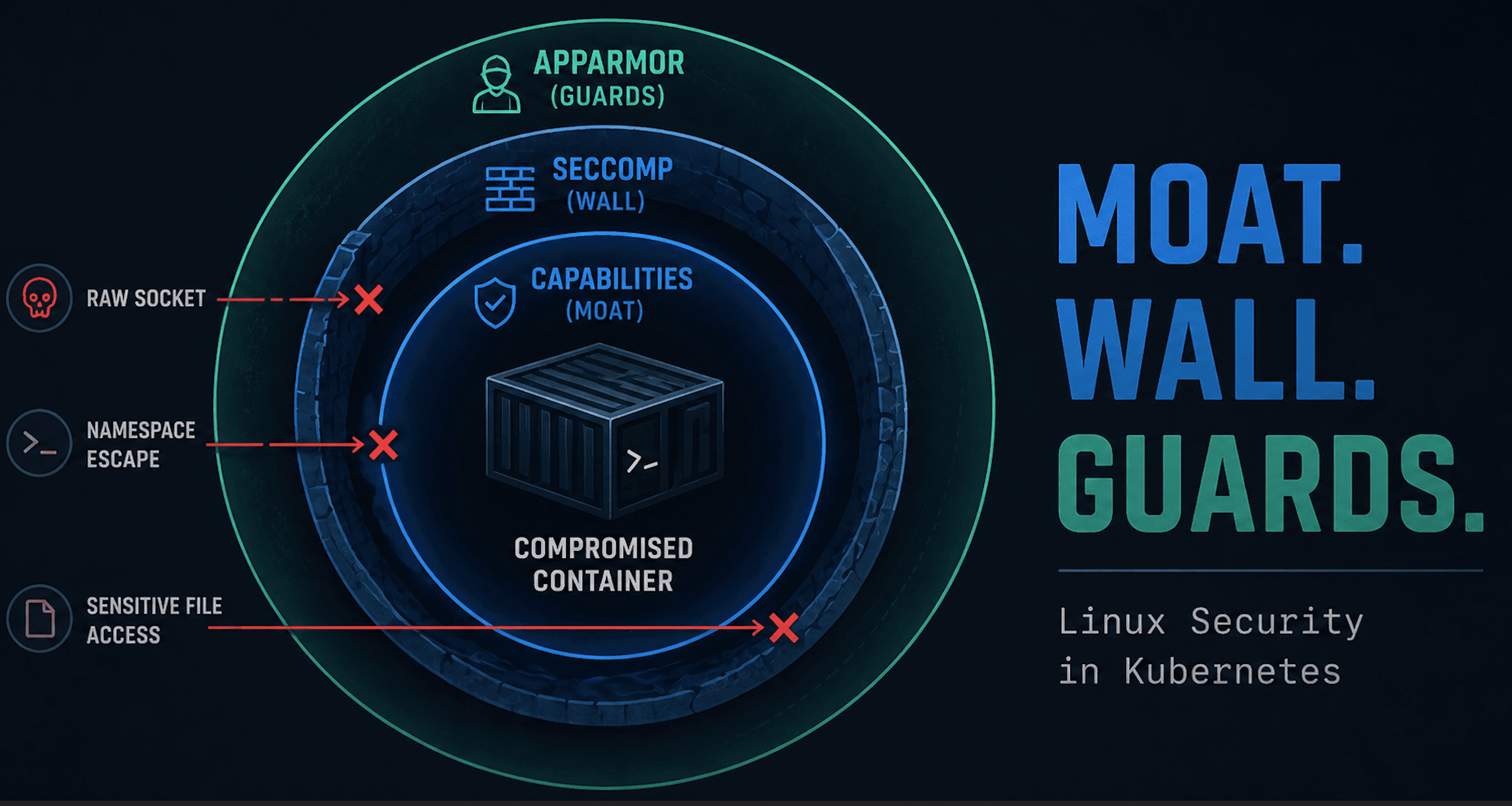
Visualizing the layers

Each layer removes a different path. Capabilities block raw socket creation, seccomp blocks namespace creation, and AppArmor blocks sensitive file access.
Wrap Up
The order here is not the point. You could build this in a different sequence and still get to the same place. So build that wall first if you so desire.
What matters is that all three layers are present.
Capabilities remove categories of actions.
seccomp restricts how the system is used.
LSMs define what behavior is allowed.
Individually, none of them solve the problem. Together, they don't do such a bad job. And hopefully I don't revisit these three for some time.