
Seccomp: The Syscall Firewall
How Linux Decides Which Syscalls Are Allowed to Exist

Working as a solutions architect while going deep on Kubernetes security — prevention-first thinking, open source tooling, and a daily rabbit hole of hands-on learning. I make the mistakes, then figure out how to fix them (eventually).
Introduction
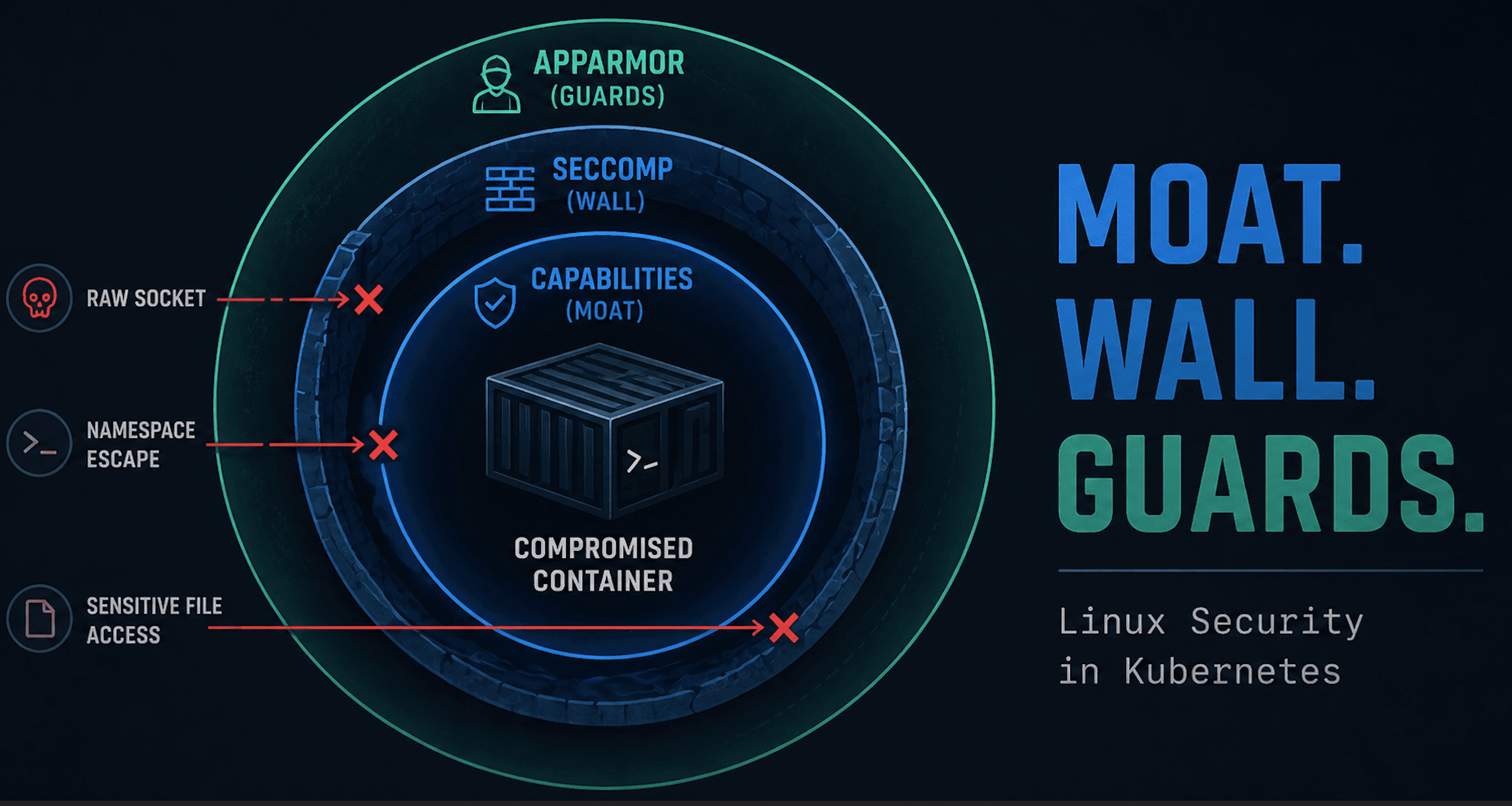
We’ve already covered two Linux security mechanisms that show up in Kubernetes securityContext:
Both matter. Both do real work. But there’s a third piece that’s just as important: seccomp.
If capabilities define what powers a process has, seccomp defines which syscalls it’s even allowed to attempt. It doesn’t care who you are or whether you’re root. It sits at the syscall boundary and says:
This syscall exists.
That one doesn’t.
Try anyway and the kernel shuts it down.
Seccomp isn’t a Kubernetes feature. It’s a Linux kernel mechanism that predates containers, evolving from a blunt “read/write/exit” sandbox into a BPF-powered filter that decides which syscalls are allowed to exist at all.
The pattern should feel familiar:
Root used to mean “try anything”
Capabilities split that power into smaller pieces
Seccomp applies the same idea to syscalls:
Old world: call whatever you want and see what happens
Seccomp: the kernel stops you before anything happens
That distinction matters. Capabilities decide whether a syscall succeeds. LSMs decide whether a resource is accessible. Seccomp decides whether the syscall ever runs. Same kernel, different choke points.
This post stays focused on seccomp as a Linux primitive. This means where it comes from, how syscall filtering actually works, and what it means to block a syscall at the kernel boundary. We'll get to YAML and "hardening checklists" later.
Orientation Diagram: Where Seccomp Intercepts Syscalls
Keep this diagram in mind. Everything in this post is about what happens at the syscall boundary. This is before permissions, before resources, and before the kernel ever executes a syscall. This is about where seccomp lives in Linux.

Where Seccomp Runs in the Kernel
Seccomp doesn’t live inside a syscall implementation, and it doesn’t care what the syscall is trying to do. Once enabled, the kernel evaluates seccomp before it dispatches the syscall to its real handler. If the filter says no, the syscall never executes.
That ordering is a key detail. When a process makes a syscall, the kernel first checks whether seccomp is active for that process. If it is, the kernel runs the attached BPF filter and asks a single question: Is this syscall allowed to exist for this process?
Only an explicit allow causes the kernel to continue. Otherwise, the kernel returns an error, sends a signal, or kills the process, never reaching the syscall’s implementation. From the kernel’s perspective, a blocked syscall is indistinguishable from one that was never there.
Why Seccomp Is a Different Control Layer
This is also why seccomp doesn’t overlap cleanly with capabilities or LSMs.
Capabilities and LSMs operate after the syscall has already been selected:
Capabilities decide whether a syscall is allowed to perform privileged actions
LSMs decide whether access to a specific object (file, socket, mount) is permitted
Seccomp runs earlier than both. It doesn’t reason about permissions or resources. It only answers whether a syscall is permitted to run at all. That makes seccomp the earliest enforcement point. It is a hard gate in front of the syscall table itself.
The One-Way Property
Once a process enters a seccomp mode, it cannot leave it.
The kernel enforces seccomp as a one-way transition: unrestricted to restricted, never the reverse. The active seccomp state is stored directly on the process and inherited across forks and execs. There is no API to remove or weaken a filter once it’s in place. Seccomp is designed so a process can only reduce its own attack surface, never expand it later.
This raises two obvious questions: Who enables seccomp in the first place and when does that happen?
How Seccomp Gets Enabled
Seccomp doesn’t apply itself automatically, and it isn’t something the kernel turns on by default. A process only enters a secure computing state when something explicitly asks the kernel to enable it.
That "something" is usually:
the process itself
or a parent process acting as a supervisor (systemd, a container runtime, a sandbox)
At the kernel level, this happens through two syscalls:
prctl()seccomp()
Both tell the kernel to place the current process into a seccomp mode.
Seccomp Is Enabled Per Process
Seccomp is a per-process setting. When it’s enabled, the kernel records that state directly on the process:
task_struct.seccomp.mode
task_struct.seccomp.filter
From that point on:
every syscall made by the process is subject to seccomp checks
all threads in the process share the same seccomp state
child processes created via
fork()inherit itexecve()does not reset it
This transition is one-way: unrestricted → restricted. There is no mechanism to remove or weaken a filter once it’s active.
What prctl() Is
prctl() isn’t part of the normal syscall execution path. It’s a configuration syscall used to change process behavior.
When a program calls:
prctl(PR_SET_SECCOMP, SECCOMP_MODE_FILTER, &filter);
it isn’t routing syscalls through prctl(). It’s making a one-time request: Attach this seccomp filter to the current process. After that, prctl() is out of the picture. All future syscalls follow the normal entry path. They just get evaluated by seccomp first.
Who Enables Seccomp in Practice
Most applications don’t enable seccomp themselves. Instead, it’s usually done by whatever launches the process:
systemd
container runtimes
application sandboxes
The pattern is consistent:
The parent process loads a seccomp filter
It enables seccomp on the child before exec
The application starts already inside a secure computing state
By the time application code runs, seccomp is already enforced.
Where We Are So Far
So far, we’ve stayed intentionally close to the kernel.
We’ve looked at where seccomp runs in the syscall path, how it gets enabled, and how a syscall can be blocked before the kernel ever executes it. That’s the core idea: seccomp reduces attack surface by deciding which syscalls are allowed to exist for a process.
At this point, we’ve talked about seccomp in the abstract. The next step is to make that concrete. But, before we look at a real example, we need to clarify one last piece of terminology: what a “seccomp profile” actually is under the hood.
What a Seccomp “Profile” Actually Is
A seccomp profile is not a policy language, nor a permissions model, and definitely not a Kubernetes abstraction.
At the kernel level, a seccomp profile is simply this:
A BPF program attached to a process that evaluates every syscall before it runs. Check out more on BPF here.
Everything else is packaging.
Profiles Are Filters, Not Rules
When seccomp runs in filter mode, the kernel executes a BPF program on every syscall. That program receives a small amount of context (the syscall number, its arguments, and the architecture). Then it gives a verdict.
That verdict isn’t abstract. It’s one of a small set of concrete actions:
allow the syscall to proceed
return an error (for example,
EPERM)send a signal
or terminate the process
There’s no concept of users, roles, or resources here. The filter doesn’t know why a syscall is happening, only which syscall it is.
Default-Deny Is the Point
Real seccomp profiles often start from a default action like:
DENY
and then explicitly allow only the syscalls the process needs. This isn’t about detecting bad behavior. It’s about reducing attack surface. From the kernel’s perspective, allowed syscalls exist; everything else does not.
Capabilities and LSMs can only restrict what a syscall is allowed to do. Seccomp can prevent the syscall from running at all.
Tooling Is Just a Compiler
Most people never write BPF by hand. Instead, they interact with seccomp through tools and profile formats:
libseccompruntime-provided defaults
human-readable profile files
All of these do the same thing:
Take a list of allowed syscalls
Compile it into a BPF program
Attach that program to the process
Once the filter is loaded, the kernel doesn’t care how it was generated. At runtime, we get a BPF program and a verdict.
Let's go full burrito and see how it actually works.
A Concrete Example: What Seccomp Actually Does
Let's walk through a tiny program that installs a seccomp filter at runtime and then makes a few syscalls before and after that filter is in place. The goal isn’t to write production-grade seccomp policy. We just want to make the enforcement behavior obvious.
What We’re Trying to Show
This program is intentionally simple, and it runs in a very specific order:
It makes a few normal syscalls (
getpid(),uname()) before any filtering is appliedIt installs a seccomp filter-mode profile at runtime
It repeats those same syscalls after the filter is active
One syscall still succeeds because it’s explicitly allowed
One syscall fails because seccomp blocks it at the syscall boundary
That before-and-after contrast lets us see seccomp doing exactly what it’s designed to do: stop a syscall before the kernel ever executes it.
To make the behavior obvious, the filter allows only a small set of syscalls:
getpid()read,write,exit,exit_group
Everything else is implicitly denied, including:
uname()
Any syscall that isn’t explicitly allowed will fail with EPERM.
The Demo Program
// seccomp_demo.c
#define _GNU_SOURCE
#include <seccomp.h>
#include <stdio.h>
#include <stdlib.h>
#include <unistd.h>
#include <errno.h>
#include <string.h>
#include <sys/utsname.h>

static void die(const char *msg) {
    perror(msg);
    exit(EXIT_FAILURE);
}

static void print_uname(const char *label) {
    struct utsname u;
    int rc = uname(&u);
    if (rc == -1) {
        printf("%s: uname() failed: errno=%d (%s)\n",
               label, errno, strerror(errno));
    } else {
        printf("%s: uname() ok: sysname=%s, release=%s\n",
               label, u.sysname, u.release);
    }
}

static void install_seccomp_filter(void) {
    int rc;
    scmp_filter_ctx ctx;

    ctx = seccomp_init(SCMP_ACT_ERRNO(EPERM));
    if (ctx == NULL) {
        die("seccomp_init");
    }

    rc  = seccomp_rule_add(ctx, SCMP_ACT_ALLOW, SCMP_SYS(read), 0);
    rc |= seccomp_rule_add(ctx, SCMP_ACT_ALLOW, SCMP_SYS(write), 0);
    rc |= seccomp_rule_add(ctx, SCMP_ACT_ALLOW, SCMP_SYS(exit), 0);
    rc |= seccomp_rule_add(ctx, SCMP_ACT_ALLOW, SCMP_SYS(exit_group), 0);
    rc |= seccomp_rule_add(ctx, SCMP_ACT_ALLOW, SCMP_SYS(getpid), 0);

    if (rc < 0) {
        seccomp_release(ctx);
        die("seccomp_rule_add");
    }

    rc = seccomp_load(ctx);
    if (rc < 0) {
        seccomp_release(ctx);
        die("seccomp_load");
    }

    seccomp_release(ctx);
}

int main(void) {
    printf("== Before seccomp ==\n");

    pid_t pid = getpid();
    printf("before: getpid() = %d\n", pid);

    print_uname("before");

    printf("\nInstalling seccomp filter (default DENY, allow read/write/exit/getpid)...\n\n");
    install_seccomp_filter();

    printf("== After seccomp ==\n");

    pid = getpid();
    printf("after: getpid() = %d (still works)\n", pid);

    print_uname("after");

    printf("\nDone.\n");
    return 0;
}
Prereqs
Ensure you have seccomp.
matt@cp:~/seccomp$ sudo apt update
sudo apt install -y libseccomp-dev
Compile and Run
matt@cp:~/seccomp$ ./seccomp_demo
== Before seccomp ==
before: getpid() = 10746
before: uname() ok: sysname=Linux, release=6.8.0-90-generic

Installing seccomp filter (default DENY, allow read/write/exit/getpid)...

== After seccomp ==
after: getpid() = 10746 (still works)
after: uname() failed: errno=1 (Operation not permitted)

Done.
At this point, we’ve seen seccomp in action!
What Actually Happened
Before seccomp was enabled, the program’s syscalls followed the normal execution path. Calls like getpid() and uname() entered the kernel, were dispatched to their respective implementations, and returned results as expected. When the seccomp filter was installed, the kernel attached a BPF program to the process and marked it as running in seccomp filter mode. From that point on, every syscall issued by the process was evaluated against that filter before the kernel considered executing it.
After seccomp was active, getpid() continued to work because it matched an explicit allow rule. The call to uname(), however, did not. The seccomp filter returned a denial verdict, and the kernel immediately enforced it by returning an error to userspace. The sys_uname() implementation was never reached.
Nothing else happened behind the scenes. There was no permission check, no resource evaluation, and no fallback logic. The syscall was intercepted, a verdict was returned, and the kernel enforced it.
That is seccomp doing exactly what it is designed to do.
Wrap Up
The demo showed seccomp doing one thing, very reliably: preventing a syscall from ever reaching the kernel implementation. Once a filter returns a verdict, the kernel enforces it and moves on. That enforcement point is what makes seccomp different from the other kernel controls we’ve looked at. Capabilities constrain what a syscall can do. LSMs constrain what a syscall can touch. Seccomp runs earlier than both and reduces attack surface by deciding which syscalls are allowed to exist in the first place.
This is why seccomp works best as a complement, not a replacement. It doesn’t understand intent, resources, or permissions, but it doesn’t need to. Its job is to shrink the set of possible behaviors before any of those questions even come up.
This post stayed intentionally close to the kernel. Before seccomp appears as a profile, a default, or a field in configuration, it’s a Linux mechanism with specific behavior and tradeoffs. Understanding that behavior is what makes higher-level abstractions predictable instead of mysterious.
In the next post, we’ll move up a layer and look at how container runtimes and Kubernetes wire this kernel primitive into pods. And we'll see why defaults like RuntimeDefault matter more than they first appear.